Alert Enrichment
Ever feel overwhelmed by alerts that lack context? Robusta enriches alerts automatically and lets you create custom enrichment rules.
Note
Looking for automatic AI enrichment? Check out Robusta for zero-configuration AI-powered alert enrichment that automatically investigates alerts and provides root cause analysis.
Builtin Alert Enrichment
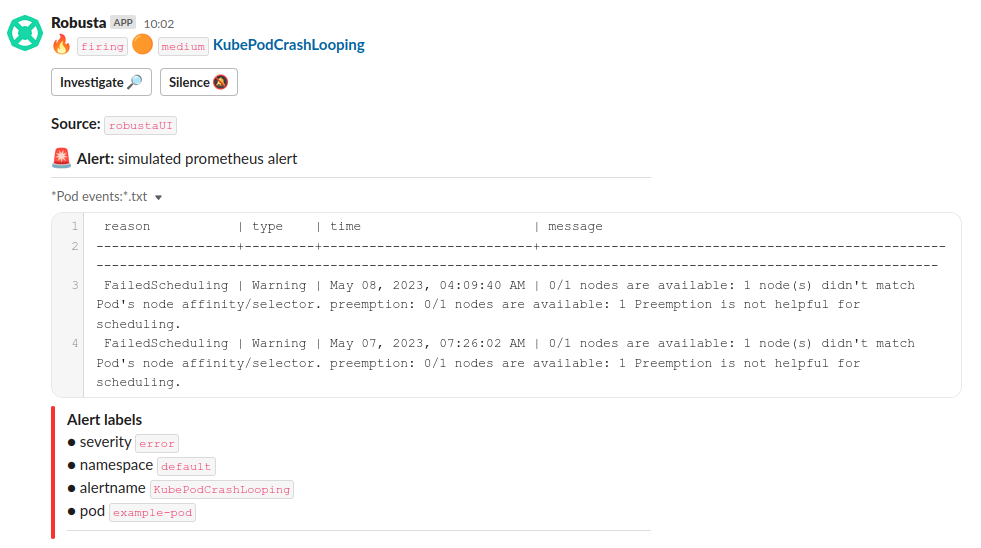
Robusta automatically enriches Prometheus alerts with relevant Kubernetes context:
Pod events - Recent events related to the affected pod
Pod logs - Relevant log excerpts from crashing or failing containers
Resource metrics - CPU, memory, and other resource usage data
Related Kubernetes objects - Deployments, ReplicaSets, ConfigMaps, etc.
This happens automatically for common Prometheus alerts without any configuration. To extend it to your own Prometheus alerts you can define custom playbooks.
Testing Alert Enrichment
Deploy a broken pod:
kubectl apply -f https://raw.githubusercontent.com/robusta-dev/kubernetes-demos/main/pending_pods/pending_pod_resources.yaml
Trigger a Prometheus alert immediately:
robusta playbooks trigger prometheus_alert alert_name=KubePodCrashLooping namespace=default pod_name=example-pod
Example Enriched Alert
Custom Alert Enrichment
Create custom enrichment rules to:
Reduce MTTR by automatically gathering system state and logs when alerts fire
Make faster decisions on which team needs to investigate
Link alerts to runbooks and documentation for better knowledge sharing
Get started with these examples:
Censoring Sensitive Data
Pod logs gathered by Robusta can be censored using Python regular expressions. For example, a payment processing pod might have credit card numbers or other sensitive information in its logs. These can be automatically sanitized before they appear in notifications.
To censor sensitive information in all logs, add the following to your Helm values file:
globalConfig:
  regex_replacement_style: SAME_LENGTH_ASTERISKS  # Alternative: NAMED
  regex_replacer_patterns:
    - name: CreditCard
      regex: "[0-9]{4}[- ][0-9]{4}[- ][0-9]{4}[- ][0-9]{4}"
    - name: Email
      regex: "[a-zA-Z0-9._%+-]+@[a-zA-Z0-9.-]+\\.[a-zA-Z]{2,}"
    - name: UUID
      regex: "[0-9a-f]{8}-[0-9a-f]{4}-[0-9a-f]{4}-[0-9a-f]{4}-[0-9a-f]{12}"
After adding these values, perform a Helm upgrade:
helm upgrade robusta robusta/robusta -f values.yaml
Given the following pod log:
# Original pod log:
2022-07-28 08:24:45.283 INFO     user's uuid: '193836d9-9cce-4df9-a454-c2edcf2e80e5'
2022-07-28 08:35:00.762 INFO     Customer email: user@example.com
2022-07-28 08:35:01.090 INFO     Payment processed with card: 4111-1111-1111-1111
The censored output will appear as:
# Using SAME_LENGTH_ASTERISKS style:
2022-07-28 08:24:45.283 INFO     user's uuid: '************************************'
2022-07-28 08:35:00.762 INFO     Customer email: ****************
2022-07-28 08:35:01.090 INFO     Payment processed with card: *******************

# Using NAMED style:
2022-07-28 08:24:45.283 INFO     user's uuid: '[UUID]'
2022-07-28 08:35:00.762 INFO     Customer email: [Email]
2022-07-28 08:35:01.090 INFO     Payment processed with card: [CreditCard]
Note: This censoring applies to logs displayed in Robusta's built-in notifications, including those shown by the following Robusta actions:
logs_enricher- Shows container logs in various alertsreport_crash_loop- Shows container logs for crashing pods