Install with ArgoCD
This tutorial installs Robusta with ArgoCD.
Prerequisites
A Kubernetes cluster with ArgoCD
A
generated_values.yamlfile. Follow the Generate a Config tutorial to generate this.
Have questions?
Ask on Slack or open a GitHub issue
Preparing Robusta's config
Prepare your generated_values.yaml file for ArgoCD:
If it's not already present, add
clusterName: <YOUR-CLUSTER-NAME>If installing on a test cluster like KIND, add
isSmallCluster: true
Example generated_values.yaml:
clusterName: my_cluster_name # <- This is the line to be added
globalConfig:
  signing_key: xxxxxx
  account_id: xxxxxx
sinksConfig:
- robusta_sink:
    name: robusta_ui_sink
    token: xxxxxx
enablePrometheusStack: true
enablePlatformPlaybooks: true
runner:
  sendAdditionalTelemetry: true
Secrets handling
Read this guide about Managing Secrets.
Configure ArgoCD in the UI
Create a NEW APP in ArgoCD and fill in the following settings.
General settings
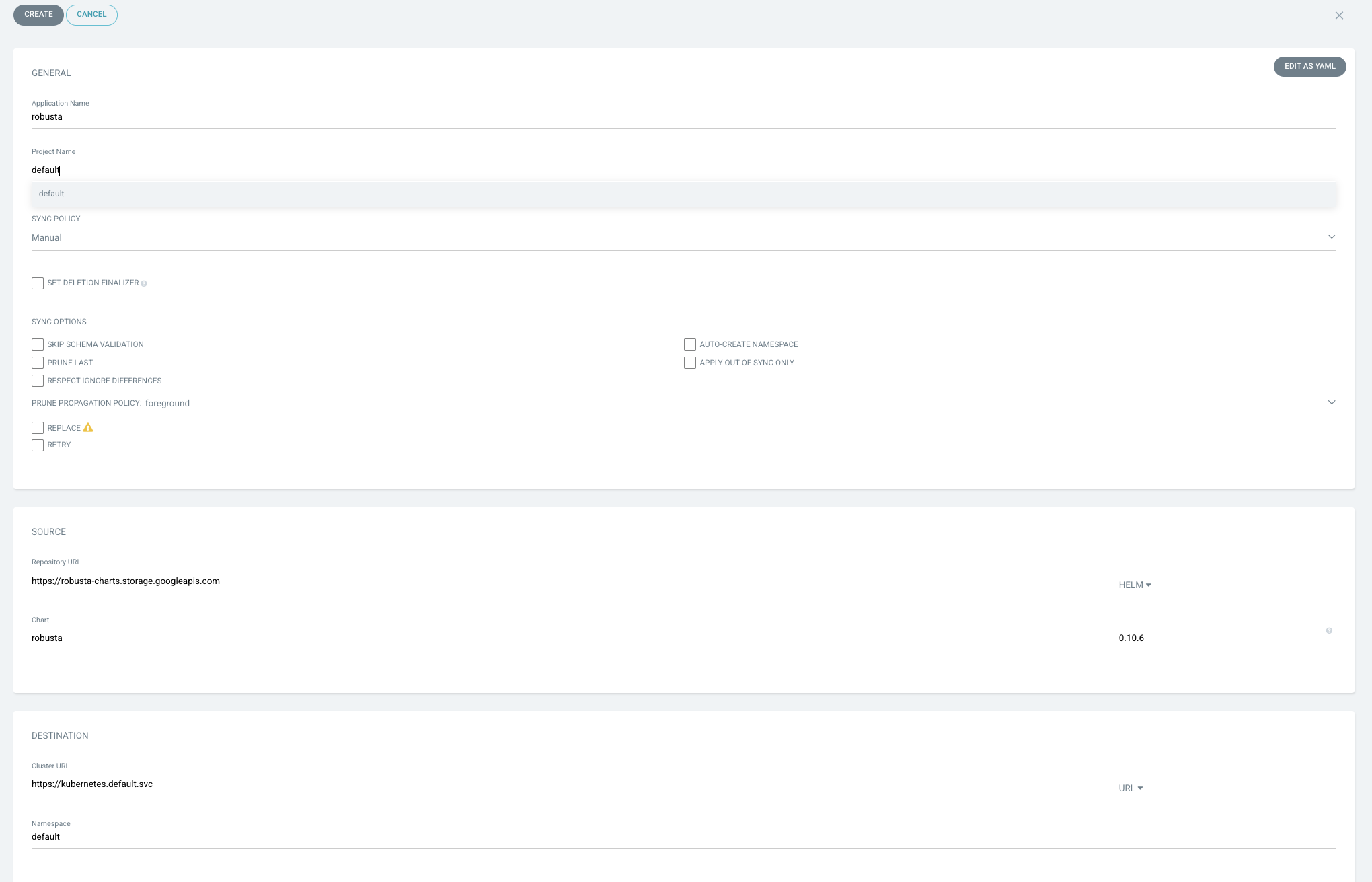
Application name: Your choice (e.g "robusta")
Project name: Your choice (e.g "default")
Sync Policy: Your choice (we recommend starting with
Manual)
Source settings
Repository URL: https://robusta-charts.storage.googleapis.com
Chart: robusta
Change the dropdown box from "GIT" to "HELM"
Version: Choose the latest stable robusta version. (
-alphaversions are not recommended.)
Destination settings
To install robusta in the same cluster as ArgoCD, use the default https://kubernetes.default.svc option
Namespace: Your choice ("default" or "robusta" is recommended)
Here is a screenshot of all settings so far:
Directory settings
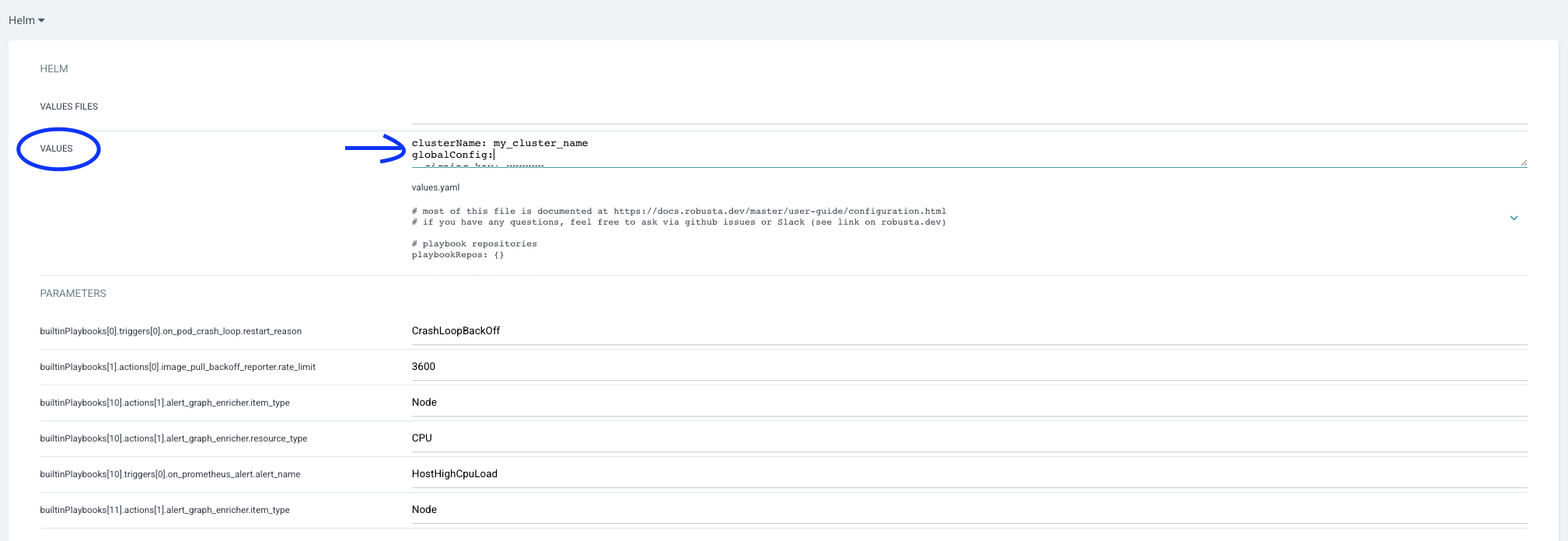
Change the "Directory" category to "Helm" by clicking the dropdown box.
Then paste the contents of generated_values.yaml into the values option.
Warning
Make sure you fill in values, not values files
Finish installing
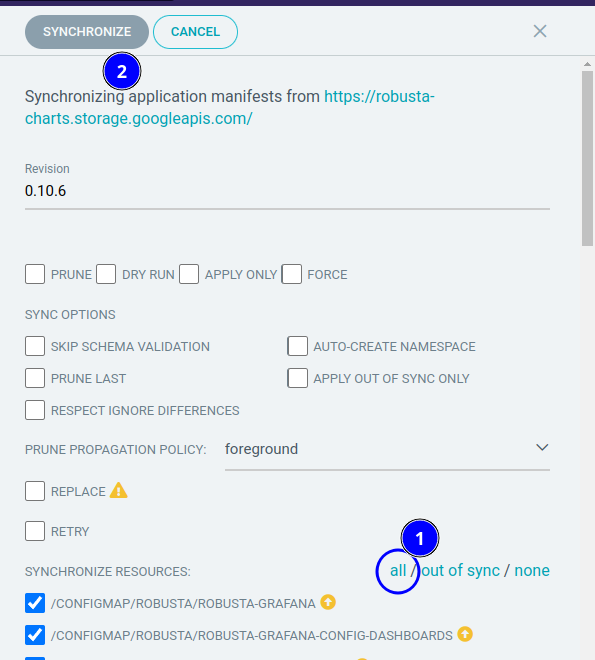
Click the create button. Then choose all and press the sync button.
Finally, run robusta logs from your cli and make sure there is no error.
Sync fails
On some Robusta versions, the sync might fail with CustomResourceDefinition.apiextensions.k8s.io “prometheuses.monitoring.coreos.com” is invalid: metadata.annotations: Too long: must have at most 262144 bytes.
To solve it, use the workaround proposed here.
Configure ArgoCD Declaratively
First generate a Helm values file for Robusta, as described above. Put it in a Git repository and push it.
Then create an Argo Application which references that values file:
apiVersion: argoproj.io/v1alpha1
kind: Application
metadata:
  name: robusta
  namespace: argocd
  finalizers:
    - resources-finalizer.argocd.argoproj.io
spec:
  destination:
    server: https://kubernetes.default.svc
    namespace: robusta
  project: default
  sources:
    - chart: robusta
      repoURL: https://robusta-charts.storage.googleapis.com
      targetRevision: <ROBUSTA VERSION - e.g. "0.10.31">
      helm:
        valueFiles:
          # this refers to the repository defined below containing your value files
          # see https://argo-cd.readthedocs.io/en/latest/user-guide/multiple_sources/#helm-value-files-from-external-git-repository
          - $values/values/robusta.yaml

    - repoURL: "git@github.com:my-user/example-repo.git"
      targetRevision: HEAD
      ref: values